This is an old revision of the document!
Fonts and Colours
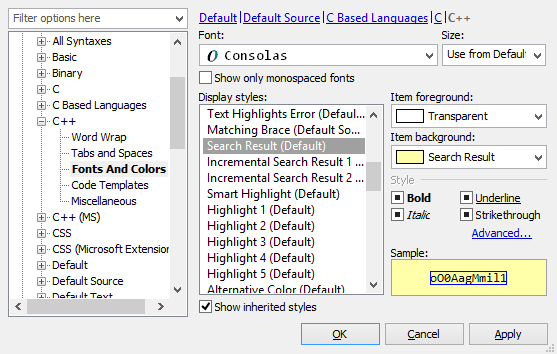 HippoEDIT has highly customizable fonts and color system, that allows you inherit settings from parent syntax, overwrite settings from parent of extend them.
You can use monospaced or non-monospaced fonts (monospaced are preferable, if you often work with block selection), any size fonts or select to use fonts from parent languages (Use from <SyntaxName>).
You can use as explicit colour as indirect colour indexes that referrers to some colour from current colour palette.
There are such predefined values for colours as:
- Automatic - hard coded values, referring to other basic colours
- Transparent - transparent colours that display colour from underlying style
- Custom - select explicit colour for style
- New - in-place creation of the new indexed colour in palette with auto referencing on it
You can define as text colour (foreground) as back colour (background).
In addition to colour settings you can set font styles as:
- Bold (true/false/inherit from style below)
- Italic (true/false/inherit from style below)
- Underlined (true/false/inherit from style below)
Strikethrough(true/false/inherit from style below)
Inheriting style means, taking value of property defined in style below, during runtime layering of styles on drawing.
Additional font styles as as squeezes, boxing, or different underlining available with direct modification of styles in syntax files ( HippoEDIT < version 1.50 ) or in Advanced Style Settings dialog (see below).
Option Show Inherited Styles controls if styles inherited from parent syntax should be shown.
Advanced Style Settings
 In addition to basic style properties, you can define advanced ones, that may be use in rare cases as error or matching indication.
Underline
Define underlining style and colour of underlining.
Style may be selected from following options:
- None - no underlining
- Diagonal - short, diagonal line underlining
- Squiggle - wave underlining
- TT - multi t-like underlining
- Plain - plain, 1px underlining
- Plain2x - plain, 2px underlining
- Plain3x - plain, 3px underlining
- Plain4x - plain, 4px underlining
Colour may be any from palette colours or explicit/custom one.
Box
Show in Overview Bar controls visibility of the style area on Overview Bar.