This is an old revision of the document!
History Edit
Edit control, with functionality to edit single line text and history of previous values, entered in sessions before.
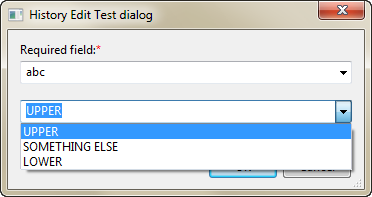
Properties
| Property | Default Value | Description |
|---|---|---|
| id | empty | id (name) of the script data object associated with control |
| text | empty | initial text of the control. Will be taken if no variable is bound (variable in dialog storage with name corresponding to id property) |
| align | stretched | Alignment of the control |
| style | none | Styles of the edit control (can be combined) |
| required | false | required property of the control (if control is initial, “positive” buttons will be disabled) |
| minwidth | 0 | Minimum width, in characters, of the edit box control |
| cuebanner | empty | Prompt shown in control background if no text is entered |
| group | empty | ID of the history group to persist |
| autocomplete | empty | Autocomplete mode |
Styles
| Style | Description |
|---|---|
| none | Default mode |
| lowercase | Characters are auto converted to lower case |
| uppercase | Characters are auto converted to UPPER case |
Example
- history_edit.hejs
var dialog_template = '@<dialog title="History Edit Test dialog" resizing="both" id="test2"> \ <paragraph id="label1" text="Required field:" style="required"/> \ <history_edit id="text1" cuebanner="Enter here something" required="true" minwidth="35" group="text_group"/> \ <spacer/> \ <history_edit id="text6" text="UppER" style="uppercase" group="upper_group"/> \ <history_edit id="text7" cuebanner="Enter URL" autocomplete="url" group="url_group"/> \ <group uniform="true" align="right"> \ <button title="&OK" returnval="ok" default="true"/> \ <button title="&Cancel" returnval="cancel"/> \ </group> \ </dialog>@'; dialog(dialog_template);