This is an old revision of the document!
Color Scheme Options
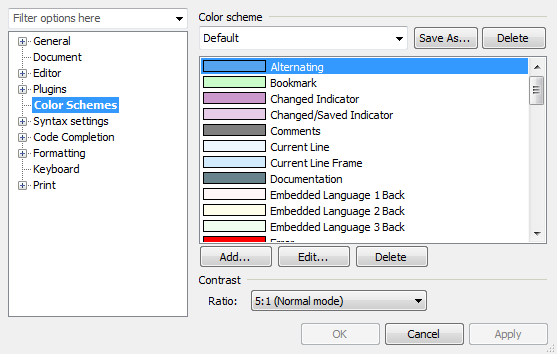 HippoEDIT supports several variants of color assignment for your code blocks (styles):
- You may assign explicit color for desired style (on "Fonts & Colors" configuration page). In this case, color stays same independently to the color palette selected. This may be OK, if all other styles in syntax defined using explicit color, but may lead to problems, if some colors are color palette depending (case below), while one can get a situation of “black-on-black”, where text or background will not be distinguishable.
- Reference one of “standard” palette colors. In that way, the color of your syntax style will change as far as you change current color palette (scheme). If in your syntax definition all styles defined using referencing colors, you may ensure that source code display will be all always consistent and visible when using different color palettes.
The last variant, using the palette color referencing is recommended.
Color Scheme
 There are only several schemes that come preinstalled together with HippoEDIT, but you can always download new ones from the website. Not installed schemes indicated in the drop-down list of the themes with gray color. If you select one such scheme, you will be asked for downloading and installing the schemes. In addition to changing of the current theme, there are options for:
- Save As… - allowing to copy currently selected scheme with a new name and working on it further
- Delete of current scheme (can not be undone!)
Defining a color

Contrast
 Contrast Ration is scheme dependent setting, that configures minimal contrast ratio, between text and background. It ensures that text is always visible on any background, resulting of style stapling. The option may adopt your configured text Foreground color in runtime.
If you want to keep your colors one-to-one as you have specified them, select “Do not change” option. The default mode is 5:1, ensuring at least 5:1 contrast ratio between text and background.